A large share of New Zealand’s workforce spends the day away from a base: field technicians, rural contractors, farm staff, drivers, inspectors, community workers, security patrols, often alone, and often somewhere the mobile signal is patchy or gone.
When something goes wrong for someone working remotely, the problem is rarely that help doesn’t exist. It’s that nobody knows they need it, nobody knows where they are, or the message can’t get out. WorkSafe’s advice on remote and isolated work sums it up: “Think safe. Stay connected. Never assume help is nearby.”
This guide sets out the practical options for keeping a remote and mobile team safe — the communication tools, the alerts that matter, what to do where there’s no coverage, both at the individual and vehicle level — so you can build a system that suits how your people actually work.
Start with the risk, not the gadget
Under the Health and Safety at Work Act 2015, businesses must eliminate risks to workers where reasonably practicable, and otherwise minimise them. For remote work, WorkSafe suggests asking whether the work can be done differently, whether it suits one person, and what support systems are in place, such as communication devices, first aid and welfare checks. It also stresses that workers should tell someone where they’re going and when they expect to be back.
Before choosing equipment, answer four questions for each role:
- Where do they work, and what coverage is there — mobile, radio, or none?
- Do they work alone, and for how long?
- What could go wrong — a fall, a vehicle incident, a medical event, an aggressive person?
- If they couldn’t call for help themselves, how would anyone know?
The answers decide which of the options below you need. Most teams end up with a combination.
Option 1: Two-way radio
Two-way radio is still the fastest way for a team to talk. Press one button and everyone in the group hears you instantly — no dialling, no waiting for someone to answer, and it works with gloves on. There are two main types, and the difference is all about coverage.
Push-to-talk over cellular (PoC)
PoC radios work like traditional two-way radios but carry voice over the 4G mobile network, so range is nationwide wherever there’s coverage. Rugged PoC radios such as the Kirisun T60/T65 and GP700 combine push-to-talk with GPS location, an SOS button and, on supported models, man-down detection and check-in timers, all reporting to a web-based dispatcher console. Signals’ PoC service is $17 plus GST per radio per month, month to month, including a nationwide SIM and data, the platform licence, programming and support.
Licensed land mobile radio (LMR)
Traditional licensed radio — simplex radio-to-radio, or a repeater on a high point — doesn’t depend on the mobile network at all. It’s the right choice for crews working in a defined area that cellular doesn’t reach: a farm, forestry block, quarry, catchment or remote work site. Coverage is engineered for that area.
Coverage: plan for the gaps
No single network covers all of New Zealand. Mobile coverage fades quickly in valleys, bush, back-country roads and inside steel buildings. The question isn’t whether your team will hit a gap, but what happens when they do. That’s covered in the fallback section below.
Option 2: Apps on the phones your team already carry
A push-to-talk app such as Press2Talk turns a smartphone into a PoC radio on the same network as your rugged radios, so app users, handhelds and vehicle radios can all share talk groups and appear on the same dispatcher console. It’s the quickest and most affordable way to bring a large or part-time workforce onto one system.
Apps suit lower-risk roles well: managers, on-call staff, property and community workers, and staff mostly working in good coverage. They’re less suited to high-risk work: a phone in a pocket or ute cab can’t reliably detect a fall, and a touchscreen is harder to use in an emergency with wet gloves on. For those roles, a rugged radio with a physical SOS button is the better tool, and because both run on the same system, you can mix them.
The alerts that matter
Talking is only part of the picture. The features that most often change the outcome of an incident are the ones that raise the alarm automatically or with a single action.
| Alert | How it works | Most useful for |
|---|---|---|
| SOS / emergency alert | A dedicated button raises an alarm to dispatch and nominated people, with the worker’s GPS location and an open voice channel | Everyone working remotely or alone |
| Man-down | The device detects a fall, a prolonged tilt or no movement for a set time, and raises the alarm automatically — even if the worker can’t press anything | Falls, vehicle and machinery risks, medical events, remote sites |
| Lone worker check-in | The worker is prompted to confirm they’re OK at set intervals; a missed check-in escalates to an alarm | Long solo tasks, night work, confined spaces, home visits |
| Live location | Continuous GPS position on a map, with history | Finding someone fast when an alarm comes in |
| Geo-fencing | An alert when someone enters or leaves an area you’ve drawn | Hazardous zones, site boundaries, expected arrival at a job |
Just as important is where the alert goes. An alarm that lands on one supervisor’s phone on silent isn’t a control. Decide who responds: your own dispatcher, a manager, the whole team or a third-party monitoring provider. Decide what happens if they don’t acknowledge, and test the full path end to end before you rely on it.
The dispatcher: the person who makes it work
Every alert, check-in and location update needs someone at the other end. The dispatch or monitoring role is what turns a set of devices into a safety system. When a worker presses SOS, misses a check-in or stops moving, the outcome depends on how quickly a person sees it, understands it and acts.
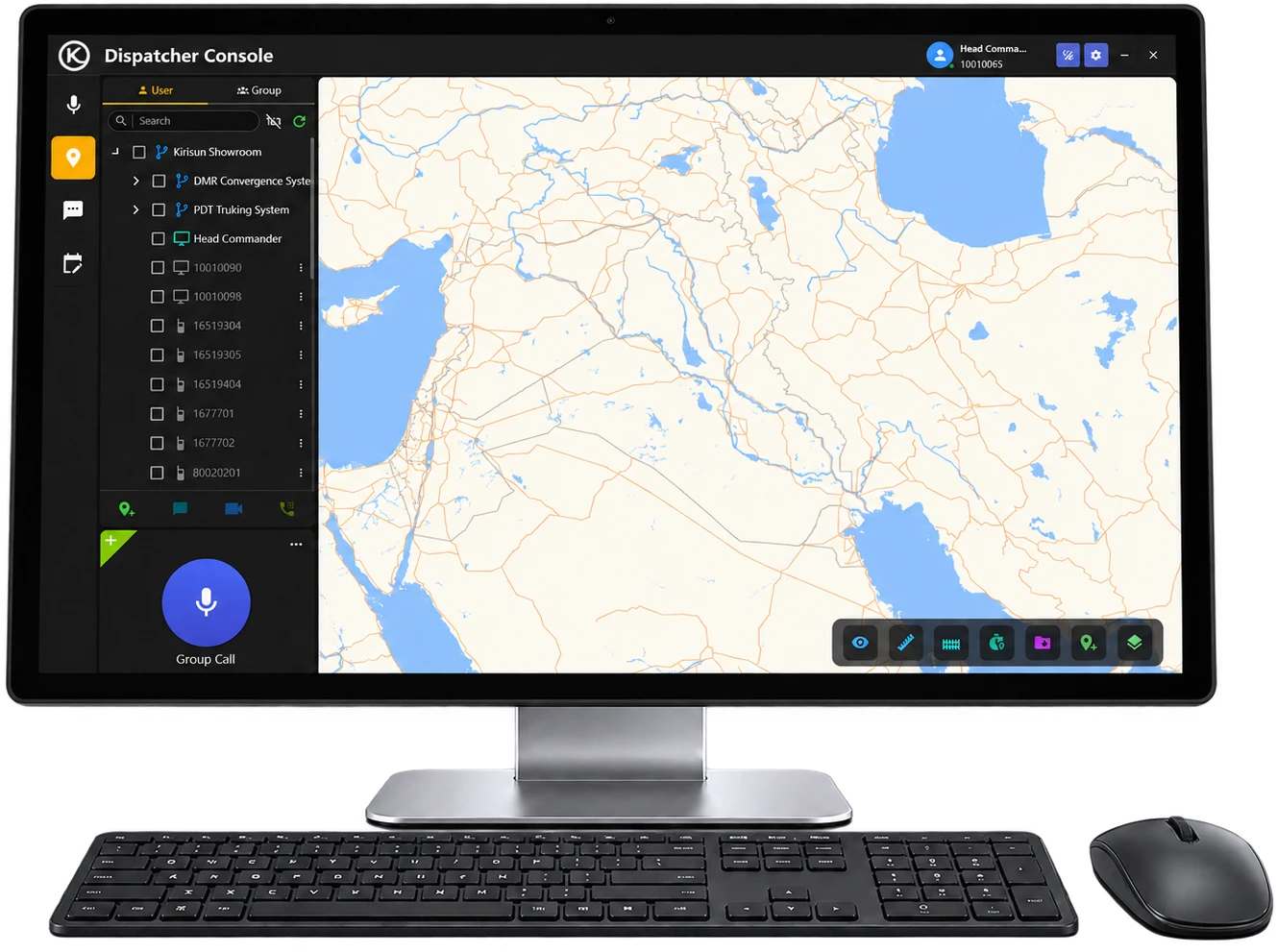
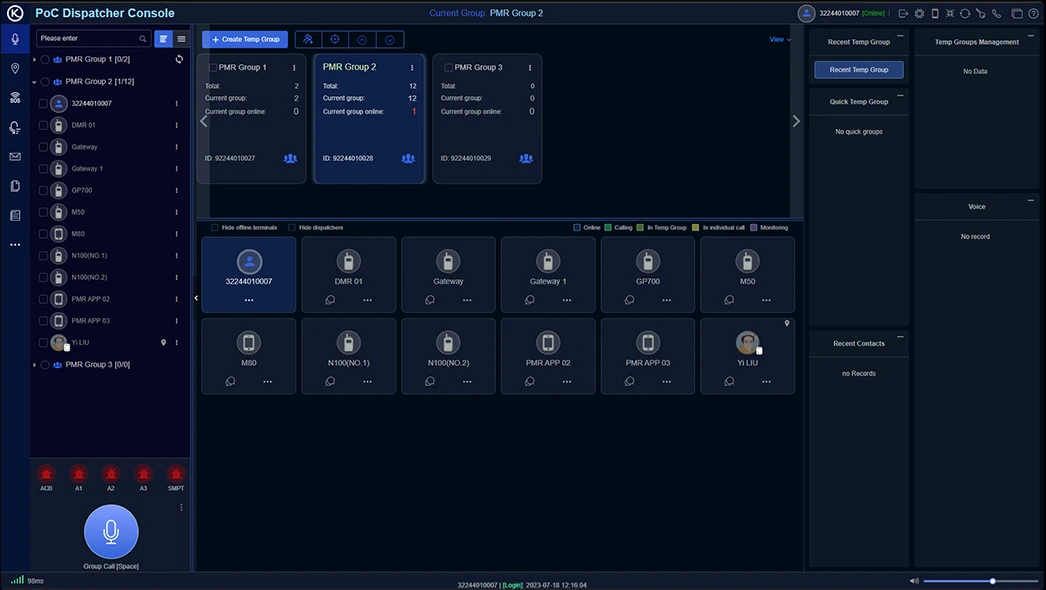
In many businesses this role has grown from answering the phone and allocating jobs into a technology-enabled safety function. A modern dispatcher works from a web-based console that brings voice, location and alerts together on one screen, so they can see a problem, talk to the people involved and coordinate help without switching between systems.
Seeing where everyone is
The console shows every radio, app user and vehicle on a live map, with location history. Dispatchers can see who is nearest to a job or an incident, confirm a worker has arrived on site, and follow the progress of someone travelling alone through a remote area.
Responding to SOS alerts
When an SOS, man-down or missed check-in alarm comes in, it appears on the dispatcher’s screen with the worker’s identity and location. The dispatcher can open a voice channel to the worker straight away, hear what is happening, call the nearest colleagues, and give emergency services an exact location rather than a best guess.
What a technology-enabled dispatcher can do
- Talk to one worker, a whole group or everyone at once, from a browser.
- Create a temporary group in seconds to coordinate an incident response.
- See at a glance who is online, in a call or out of contact.
- Use geofences to be alerted when someone arrives at or leaves a site or hazardous area.
- Review location history and call records after an incident or near miss.
Who should do it?
The right set-up depends on the size of your team and the hours they work:
- A dedicated dispatcher or control room, for larger fleets and 24/7 operations.
- A supervisor or office team member who monitors the console alongside other work, with clear rules on response times.
- A roster of nominated managers who receive after-hours alerts on their own devices.
- A third-party monitoring provider, where you need 24/7 cover without staffing it yourself.
Whoever fills the role needs training, a written response procedure, a backup when they are away, and regular drills. The technology makes the dispatcher faster and better informed. It doesn’t replace the need for someone ready to respond.
What happens without coverage? Building a fallback
The best remote safety systems are layered, so that when one network runs out, the next one takes over. A practical sequence looks like this:
| Layer | What it does | Where it works |
|---|---|---|
| PoC radio or app on 4G | Voice, SOS, man-down, check-ins and location to dispatch | Anywhere with mobile coverage |
| Vehicle router with roof antennas and dual SIM | Holds onto weak signal and shares it as Wi-Fi around the vehicle; can switch between two carriers | Weak-signal areas, around the vehicle |
| Starlink at the vehicle or site | Provides an internet link where there’s no mobile coverage, so PoC and apps work over Wi-Fi | No-coverage areas, around the vehicle, camp or site |
| Licensed radio (simplex or repeater) | Direct radio contact independent of the mobile network | Defined work areas with engineered coverage |
| Personal locator beacon (PLB) | Sends a distress alert and location by satellite to the Rescue Coordination Centre New Zealand | Anywhere outdoors with a view of the sky |
Personal locator beacons: the last line of defence
A 406 MHz PLB needs no mobile coverage, Wi-Fi or subscription. When activated, it alerts the Rescue Coordination Centre New Zealand (RCCNZ), which coordinates the search and rescue response. A few points for workplaces:
- Register every beacon. Registration of NZ-coded beacons is free and a legal requirement, and it gives RCCNZ your emergency contacts. Use contacts who can tell RCCNZ about the worker, their plans and their vehicle.
- A PLB is for life-threatening emergencies. It alerts search and rescue, not your office, so it complements radio rather than replacing it.
- Carry it on the person, not in the vehicle. A beacon left in the ute is no help to someone injured 500 metres away.
- Choose a model with Return Link Service where possible, so the user gets confirmation that the alert has been received.
- Include carriage, testing and battery expiry dates in your remote work procedures.
In vehicles: live GPS tracking
For many mobile teams, the vehicle is the base for the day — and often the last known location when something goes wrong. Vehicle GPS tracking adds a layer that works in the background, without anyone needing to do anything:
- Live location and trip history, so you know where every vehicle is and where it has been.
- Geofences with automatic arrival and departure, so you can see when a worker reaches and leaves a job.
- A second source of location if a handheld is damaged, flat or left behind.
- Driver behaviour monitoring — speed, harsh braking, acceleration and cornering, scored per driver — because for many remote workers the drive is the riskiest part of the day.
Signals’ GPS fleet tracking starts at $15 plus GST per vehicle per month for live tracking, with driver behaviour and scoring included from $18 plus GST. Fitting GPS, a PoC mobile radio and a vehicle router at the same time means one installation and one point of contact.
Matching the options to your team
| Worker profile | Typical roles | Suggested combination |
|---|---|---|
| Mobile, mostly in coverage, lower risk | Managers, sales, property and community staff | Press2Talk app, vehicle GPS |
| Mobile, regional travel, moderate risk | Field technicians, inspectors, service crews | PoC radio with SOS, vehicle GPS, vehicle router |
| Alone, higher risk | Utilities, forestry, quarry, security, night work | Rugged PoC radio with SOS, man-down and check-ins; dispatcher; vehicle GPS |
| Defined remote area | Farms, forestry blocks, remote sites | Licensed radio (simplex or repeater), plus PoC where coverage allows |
| Beyond any network | Back-country, off-road, remote catchments | Any of the above, plus a registered PLB on the person; Starlink at the vehicle or camp |
Putting it into practice
- Map your people. List each role, where they work, how long they’re alone and what coverage they have.
- Choose the tools for each risk level, using the table above as a starting point.
- Set the response. Decide who receives alerts, how they escalate and what happens out of hours.
- Write it into procedures, including trip plans, check-in times and PLB use.
- Train your team, and involve them — they know the dead spots and the real risks.
- Test end to end, then review regularly and after any incident or near miss.
How Signals can help
Signals brings every layer of a remote and mobile safety system together under one roof — and installs and supports it with our own people.
- PoC radios, the Press2Talk app and a web dispatcher console, on New Zealand’s first PoC network, built by Signals in 2018 and now supporting around 3,500 devices in the field.
- Licensed radio systems, from simplex to repeaters, with 312 active radio licences managed for customers.
- Exclusive New Zealand distributor for Kirisun, and authorised dealer for Icom, Kenwood and GME, including GME personal locator beacons.
- Vehicle GPS tracking with driver behaviour, and vehicle Wi-Fi routers to extend coverage.
- Our own technicians in Christchurch and Auckland, working on site nationwide.
Scope your free trial. We’ll work through how your team works, recommend the right combination and put demo equipment in your team’s hands. Call 0800 454 756 or email sales@signals.co.nz.
Related: Lone worker safety in New Zealand · A scalable lone worker app · Driver behaviour monitoring for fleets
Common questions
What is the best way to communicate with remote workers?
For most mobile teams, PoC radios give the best mix of instant group talk, nationwide range and safety features. Where crews work in a defined area without mobile coverage, licensed two-way radio is more reliable. Many businesses use both.
What is a man-down alarm?
A man-down alarm is triggered automatically when a device detects a fall, a prolonged tilt or no movement for a set period. It raises the alarm even if the worker is unconscious or can’t press a button.
What is a lone worker check-in?
A check-in timer prompts a worker to confirm they’re safe at set intervals. If they miss a check-in, the system escalates to an alarm so someone follows up.
What should my team use where there’s no mobile coverage?
Options include a vehicle router with roof antennas to hold onto weak signal, Starlink at the vehicle or site, licensed two-way radio for a defined work area, and a registered PLB on the person for life-threatening emergencies.
Do I need vehicle GPS if my team has radios with GPS?
They do different jobs. Radio GPS shows where the person is; vehicle GPS tracks the vehicle and how it’s driven, and works even if the radio is flat or left behind.
This article is general information and isn’t legal advice. Responsibility for health and safety compliance rests with each PCBU.
Sources
- WorkSafe — Remote and isolated work: worksafe.govt.nz
- Beacons.org.nz — Why get and register a beacon?: beacons.org.nz
- Signals NZ — Lone worker safety: signals.net.nz/lone-worker/
- Signals NZ — GPS and fleet tracking: signals.net.nz/gps-and-fleet-tracking/